
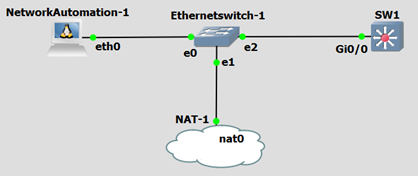
Step1: Install python on Windows/Linux or run ‘Network Automation Appliance’ on GNS3 which has pre-installed python & Netmiko
Step2: Install Netmiko
Install Netmiko
apt-get update
apt-get install python -y
apt-get install build-essential libssl-dev libffi-dev -y
apt-get install python-pip –y
apt-get installpython-dev # You may need to install this as well

pip install cryptography
pip install netmiko
Step3: To verify is Netmiko is installed or not:
	>>> import netmiko
>>> print netmiko.__version__
Step4: Configure router for SSH
	Hostname SW1
	Int gi0/0
		ip add 192.168.10.21 255.255.255.0
 		No sh
	ip domain-name s4u.in
	crypto key generate rsa		1024 bits
	enable password cisco
	username rachit password cisco
	line vty 0 4
		login local
		transport input all
Step5: Make sure you are able to ping Network Automation device.
Step6: Below Python script to run on GNS3 Appliance – Network Automation. Script will make SSH connection to device and configure loopbacks, OSPF protocols with Vlans
| from netmiko import ConnectHandler iosv_l2 = { ‘device_type’: ‘cisco_ios’, ‘ip’: ‘192.168.10.21’, ‘username’: ‘rachit’, ‘password’: ‘cisco’, ‘port’: ’22’, ‘secret’: ‘cisco’, } net_connect = ConnectHandler(**iosv_l2) output = net_connect.send_command(‘show ip int brief’) print output net_connect.enable() config_commands = [‘int loop 0’, ‘ip address 1.1.1.1 255.255.255.0’] output = net_connect.send_config_set(config_commands) print output for n in range (2,5): print “Creating VLAN ” + str(n) config_commands = [‘vlan ‘ + str(n), ‘name Python_VLAN ‘ + str(n)] output = net_connect.send_config_set(config_commands) print output |